
Note: This post is intended as a starting point to experiment with rather than a complete solution.
Introduction
When you give an AI agent access to your machine, you are also giving it access to your data, credentials, and network.
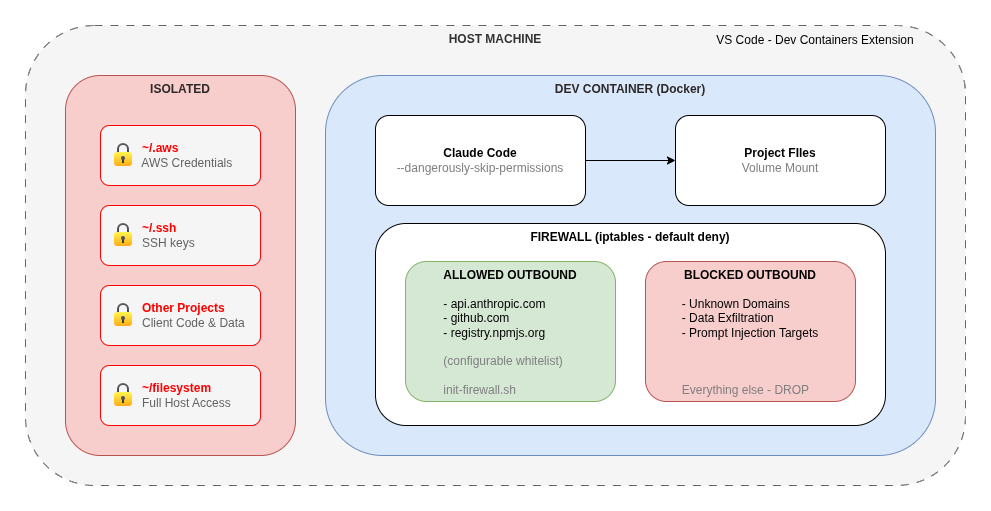
A dev container draws a hard boundary around that access. The AI runs inside a Docker container with a restricted filesystem and a tightly controlled firewall, rather than directly on your machine.
We need to treat AI Agents like junior developers. We do this by creating disposable environments where they can build and fail safely.
This article walks through how to set up a dev container for Claude Code that works with VS Code.
What is a Dev Container?
A dev container is a Docker container configured for development that VS Code connects to. It is configured in three files that live in a .devcontainer/ directory at the root of your project:
devcontainer.json- controls VS Code settings, extensions, and volume mountsDockerfile- defines the container image and installed toolsinit-firewall.sh- establishes network security rules at container startup
VS Code’s Dev Containers extension reads this directory and offers to reopen your project inside the container. From that point, your terminal, file access, and extensions all run inside Docker, not on your host machine.
Getting Started
Anthropic publishes a reference dev container implementation in the Claude Code repository that you can use as a starting point.
1. Install the prerequisites
- Docker
- VS Code with the Dev Containers extension
2. Copy the .devcontainer directory into your project
curl -L https://github.com/anthropics/claude-code/archive/refs/heads/main.tar.gz | \
  tar -xz --strip-components=1 claude-code-main/.devcontainer
Or clone the repo and copy the .devcontainer folder manually.
3. Reopen in container
Open the project in VS Code and either:
- Click Reopen in Container when prompted, or
- Open the Command Palette (
Cmd+Shift+P), then Dev Containers: Reopen in Container
VS Code will build the image and drop you into a fully configured environment with Claude Code installed and ready to use.
Running Claude Code Inside the Container
Once inside the container, Claude Code can be run with the --dangerously-skip-permissions flag, which bypasses the usual approval prompts.
claude --dangerously-skip-permissions
Without a dev container, this flag gives Claude Code unrestricted access to your machine. Inside the container, it can only reach what the container exposes which is now strictly controlled.
Security Benefits
- Filesystem Isolation
- Claude Code can only read and write within the container’s filesystem. Volume mounts in
devcontainer.jsongive you explicit control over exactly what is shared.
- Claude Code can only read and write within the container’s filesystem. Volume mounts in
- Network Firewall
- The
init-firewall.shscript appliesiptablesrules at container startup that implement a default-deny outbound policy. Only a small whitelist of domains is permitted by default. - All other outbound traffic is blocked. This is a significant protection against data exfiltration by prompt injection attacks.
- The
- Credential Protection
- Your local AWS profiles, GitHub tokens, etc. are not visible unless you explicitly mount them. This limits the blast radius of any unexpected or malicious action.
- Project Isolation
- Blast radius limited to the project you’re working in. Useful for agency or consultancy work where client separation is required.
Customising the Container
The reference implementation is a starting point, but you should review this and harden it to your own security standards. Common customisations include:
- Adding tools: Install language runtimes, CLI tools, or SDKs in the
Dockerfile - Adjusting firewall rules: Add domains to the whitelist in
init-firewall.shif your project needs additional external access - Mounting credentials selectively: Add specific volume mounts in
devcontainer.jsonfor credentials Claude Code genuinely needs (e.g. a read-only AWS profile)
A Note on Remaining Risks
The dev container provides substantial protection, but there are still risks. Only use Agentic AI when developing with trusted repositories.
Claude provide this as a starting point for a local development environment, it is not the end solution.
Summary
Dev containers help give Claude Code a hard security boundary. Filesystem access is scoped to the project, network access is restricted to a whitelist, and host credentials stay off limits by default.
Anthropic give a good reference implementation to get started with, but you should review this and lock it down to your own security standards.