
Introduction
The most fun part of kubernetes is learning how to autoheal your application when things break.
Let’s look at using Kind to create a local kubernetes cluster and k6 to test it.
- Kind is a tool that let’s us easily create a local kubernetes cluster. This is ideal for creating throw away cluster environments.
- K6 is a performance testing tool that let’s us simulate user traffic and measure the response time of our application.
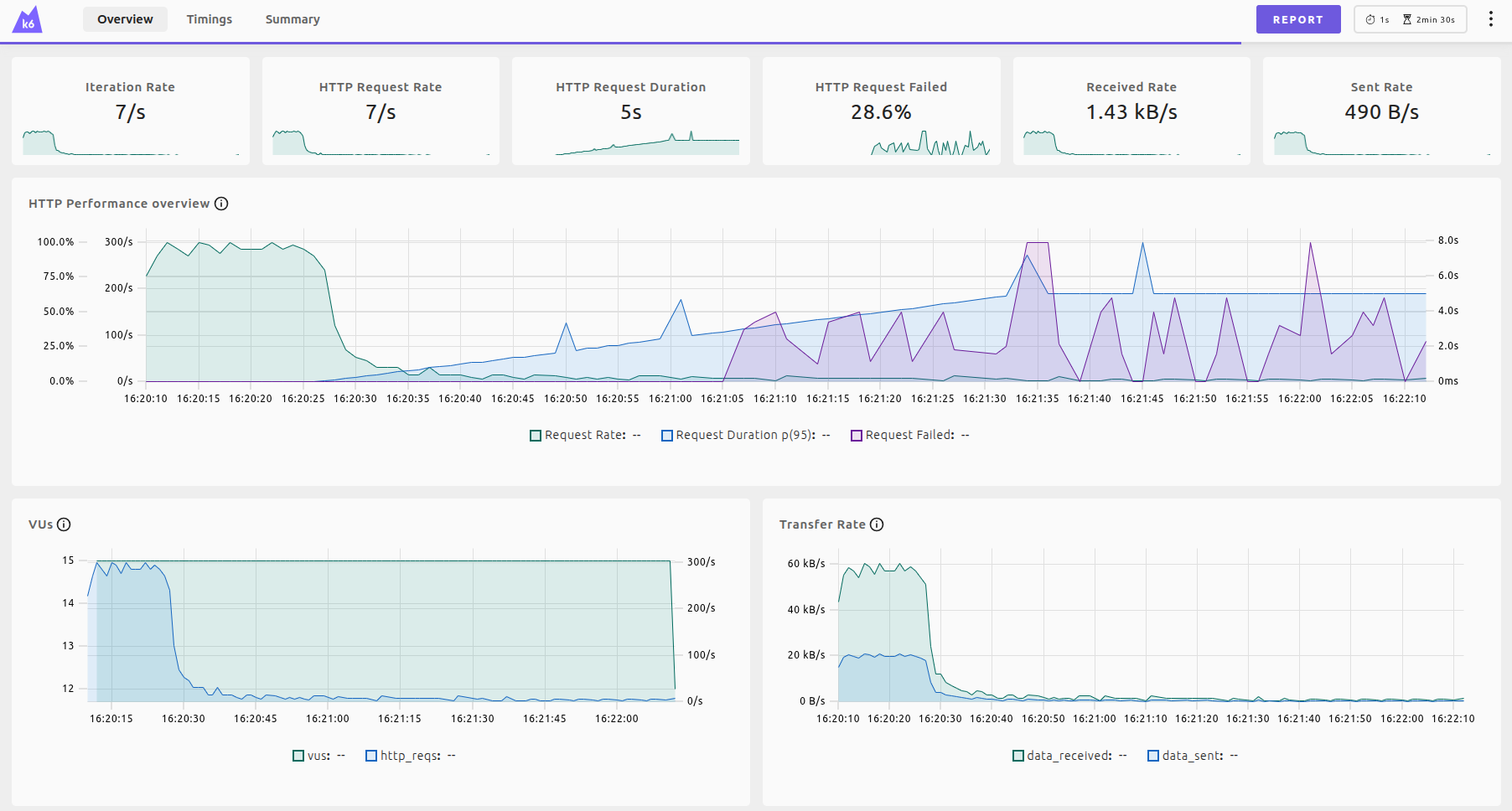
Our test will also touch on chaos engineering by killing a pod every 10 seconds. You can see the latency and error spikes in the graph above.
Demo Script
Below is a sample end-to-end bash script (kind-demo.sh). It automates:
- Spinning up a local Kind cluster with host port mapping (
8088->30088). - Deploying a 3-replica Python HTTP server with time-based latency degradation (
0.08s/secslope after 30s) and 33% HTTP 500 error probability when delay exceeds 3s. - Running a tiny Chaos Engineering subshell that force-kills 1 pod every 10 seconds and logs active pod counts.
- Executing a k6 load test with real-time Web UI streaming on
http://localhost:5665and exporting./k6-report.html.
IMPORTANT: Do not run this directly. This is intended for read-only learning purposes only.
#!/usr/bin/env bash
set -euo pipefail

echo "!! Do not run this directly. This is intended for read-only learning purposes only."
exit 1

# Script Configuration
CLUSTER_NAME="${CLUSTER_NAME:-kind-demo}"
NAMESPACE="default"
LOCAL_PORT=8088
NODE_PORT=30088
SERVICE_NAME="python-hello-svc"
DEPLOYMENT_NAME="python-hello"
DASHBOARD_PORT=5665
DASHBOARD_PID=""
CHAOS_PID=""
REPORT_FILE="k6-report.html"
REPORT_DIR="/tmp/k6-dashboard-${CLUSTER_NAME}"

# Parameter 1: Load test duration (default: 1m)
TEST_DURATION="${1:-${K6_DURATION:-1m}}"
if [[ "${TEST_DURATION}" =~ ^[0-9]+$ ]]; then
    TEST_DURATION="${TEST_DURATION}s"
fi

# Parameter 2 / Env: Enable Chaos pod killer (default: true)
ENABLE_CHAOS="${2:-${ENABLE_CHAOS:-true}}"

echo "=========================================="
echo " Starting Kind Demo Workflow"
echo " Duration:     ${TEST_DURATION}"
echo " Chaos:        ${ENABLE_CHAOS}"
echo " Endpoint:     http://localhost:${LOCAL_PORT}"
echo "=========================================="

# Cleanup function to stop background processes on script exit
cleanup() {
    echo ""
    echo "=========================================="
    echo " Cleaning up background processes..."
    echo "=========================================="

    if [ -n "${CHAOS_PID:-}" ] && kill -0 "${CHAOS_PID}" 2>/dev/null; then
        echo "Stopping Chaos process (PID: ${CHAOS_PID})..."
        kill "${CHAOS_PID}" || true
    fi

    if [ -n "${DASHBOARD_PID:-}" ] && kill -0 "${DASHBOARD_PID}" 2>/dev/null; then
        echo "Stopping k6 Web Dashboard server (PID: ${DASHBOARD_PID})..."
        kill "${DASHBOARD_PID}" || true
    fi

    rm -rf "${REPORT_DIR}" || true
}

# Register cleanup trap for background processes on EXIT, INT, TERM
trap cleanup EXIT INT TERM

# Step 1: Run kind k8s cluster with NodePort mapping to localhost:8088
echo "[Step 1/5] Creating Kind cluster '${CLUSTER_NAME}' with NodePort mapping..."
if kind get clusters 2>/dev/null | grep -q "^${CLUSTER_NAME}$"; then
    echo "Cluster '${CLUSTER_NAME}' already exists. Recreating..."
    kind delete cluster --name "${CLUSTER_NAME}"
fi

cat <<EOF | kind create cluster --name "${CLUSTER_NAME}" --config -
apiVersion: kind.x-k8s.io/v1alpha4
kind: Cluster
nodes:
- role: control-plane
  extraPortMappings:
  - containerPort: ${NODE_PORT}
    hostPort: ${LOCAL_PORT}
    listenAddress: "127.0.0.1"
    protocol: TCP
EOF

echo "Waiting for Kubernetes cluster nodes to be Ready..."
MAX_ATTEMPTS=30
ATTEMPT=0
until kubectl wait --for=condition=Ready node --all --timeout=10s &>/dev/null || [ ${ATTEMPT} -eq ${MAX_ATTEMPTS} ]; do
    sleep 2
    ATTEMPT=$((ATTEMPT + 1))
done

if [ ${ATTEMPT} -eq ${MAX_ATTEMPTS} ]; then
    echo "Error: Timed out waiting for cluster nodes to be Ready."
    exit 1
fi
echo "Kubernetes control-plane is Ready!"

TEST_START_TIMESTAMP=$(date +%s)

# Step 2: Create Deployment with 3 replicas running Python HTTP server with 2x degradation & 500 error probability above 3s
echo "[Step 2/5] Creating Deployment with 3 replicas running degrading Python HTTP server..."
cat <<EOF | kubectl apply -f -
apiVersion: apps/v1
kind: Deployment
metadata:
  name: ${DEPLOYMENT_NAME}
  namespace: ${NAMESPACE}
  labels:
    app: python-hello
spec:
  replicas: 3
  selector:
    matchLabels:
      app: python-hello
  template:
    metadata:
      labels:
        app: python-hello
    spec:
      containers:
      - name: python-hello
        image: python:3.11-slim
        env:
        - name: TEST_START_TIME
          value: "${TEST_START_TIMESTAMP}"
        command: ["python3", "-c"]
        args:
        - |
          from http.server import ThreadingHTTPServer, BaseHTTPRequestHandler
          import socket, time, os, random

          start_time = float(os.environ.get("TEST_START_TIME", time.time()))

          class Handler(BaseHTTPRequestHandler):
              protocol_version = "HTTP/1.1"

              # Avoid slow reverse DNS lookup on client IP address
              def address_string(self):
                  return self.client_address[0]

              def do_GET(self):
                  elapsed = time.time() - start_time

                  # 2x Degradation Slope:
                  # - 0s to 30s: fast responses (~2-5ms latency)
                  # - 30s+: latency grows at 0.08s per second (up to 5.0s)
                  # - If delay > 3.0s: 33% chance of returning 500 Internal Server Error

                  delay = 0.0
                  if elapsed > 30:
                      delay = min((elapsed - 30) * 0.08, 5.0)
                      time.sleep(delay)

                  if delay > 3.0 and random.random() < 0.33:
                      self.send_response(500)
                      self.send_header('Content-type', 'text/plain')
                      self.send_header('Connection', 'close')
                      self.end_headers()
                      self.wfile.write(b"500 Internal Server Error - Severe Degradation (>3s)\n")
                      return

                  msg = f"Hello World from Python on pod {socket.gethostname()}!\n".encode()
                  self.send_response(200)
                  self.send_header('Content-type', 'text/plain')
                  self.send_header('Content-Length', str(len(msg)))
                  self.end_headers()
                  self.wfile.write(msg)

              def log_message(self, format, *args):
                  return

          server = ThreadingHTTPServer(('0.0.0.0', 8080), Handler)
          print("Degrading Python ThreadingHTTPServer running on port 8080...")
          server.serve_forever()
        ports:
        - containerPort: 8080
        resources:
          requests:
            cpu: 50m
            memory: 64Mi
EOF

echo "Waiting for Deployment '${DEPLOYMENT_NAME}' to be ready..."
kubectl rollout status deployment/${DEPLOYMENT_NAME} --timeout=120s

# Step 3: Expose this deployment via NodePort 30088 (mapped to host 8088)
echo "[Step 3/5] Exposing deployment via NodePort 30088 -> host 8088..."
cat <<EOF | kubectl apply -f -
apiVersion: v1
kind: Service
metadata:
  name: ${SERVICE_NAME}
  namespace: ${NAMESPACE}
spec:
  type: NodePort
  selector:
    app: python-hello
  ports:
  - port: 80
    targetPort: 8080
    nodePort: ${NODE_PORT}
EOF

echo "Waiting for NodePort service to respond..."
MAX_ATTEMPTS=20
ATTEMPT=0
until curl -s "http://localhost:${LOCAL_PORT}" > /dev/null 2>&1 || [ ${ATTEMPT} -eq ${MAX_ATTEMPTS} ]; do
    sleep 1
    ATTEMPT=$((ATTEMPT + 1))
done

if [ ${ATTEMPT} -eq ${MAX_ATTEMPTS} ]; then
    echo "Error: Timed out waiting for service at http://localhost:${LOCAL_PORT}"
    exit 1
fi
echo "NodePort active! Test response:"
curl -s "http://localhost:${LOCAL_PORT}"

# Launch Chaos background process if enabled (predictably every 10 seconds)
if [ "${ENABLE_CHAOS}" = "true" ]; then
    echo "Starting Chaos process (predictably killing 1 pod every 10 seconds)..."
    (
        set +e
        while true; do
            sleep 10

            PODS=($(kubectl get pods -l app=python-hello --field-selector=status.phase=Running -o jsonpath='{.items[*].metadata.name}' 2>/dev/null || true))

            if [ ${#PODS[@]} -gt 0 ]; then
                RAND_IDX=$(( RANDOM % ${#PODS[@]} ))
                TARGET_POD="${PODS[$RAND_IDX]}"
                echo ""
                echo "🔥 [Chaos] Terminating pod '${TARGET_POD}' (10-second cycle)..."
                kubectl delete pod "${TARGET_POD}" --grace-period=0 --force > /dev/null 2>&1 || true
                echo "💥 [Chaos] Pod '${TARGET_POD}' terminated."

                # Get and display active pod count
                TOTAL_PODS=$(kubectl get pods -l app=python-hello --no-headers 2>/dev/null | wc -l | tr -d ' ')
                RUNNING_PODS=$(kubectl get pods -l app=python-hello --field-selector=status.phase=Running --no-headers 2>/dev/null | wc -l | tr -d ' ')
                echo "📊 [Chaos] Pod Status: ${RUNNING_PODS}/${TOTAL_PODS} Running (Kubernetes auto-healing)"
                echo ""
            fi
        done
    ) &
    CHAOS_PID=$!
fi

# Step 4: Run k6 load test against the service
echo ""
echo "[Step 4/5] Running ${TEST_DURATION} k6 load test (quiet mode)..."
echo "Live k6 Web Dashboard: http://localhost:${DASHBOARD_PORT}"
echo ""

K6_TEST_SCRIPT=$(cat <<EOF
import http from 'k6/http';
import { check, sleep } from 'k6';

export const options = {
  vus: 15,
  duration: '${TEST_DURATION}',
  thresholds: {
    http_req_failed: ['rate<0.05'],
    http_req_duration: ['p(95)<500'],
  },
};

export default function () {
  const res = http.get('http://localhost:${LOCAL_PORT}');
  check(res, {
    'status is 200': (r) => r.status === 200,
    'body contains Hello World': (r) => r.body && r.body.includes('Hello World from Python'),
  });
  sleep(0.05);
}
EOF
)

# Clean previous report file if present
rm -f "${REPORT_FILE}"

# Run k6 in quiet mode (-q) with Web Dashboard enabled
set +e
if command -v k6 &> /dev/null; then
    echo "Running native k6 binary for ${TEST_DURATION}..."
    echo "${K6_TEST_SCRIPT}" | K6_WEB_DASHBOARD=true K6_WEB_DASHBOARD_PORT=${DASHBOARD_PORT} K6_WEB_DASHBOARD_EXPORT=${REPORT_FILE} K6_WEB_DASHBOARD_PERIOD=1s k6 run -q -
    K6_EXIT_CODE=$?
else
    echo "Native k6 binary not found. Running k6 via Docker for ${TEST_DURATION}..."
    echo "${K6_TEST_SCRIPT}" | docker run --rm -i --user "$(id -u):$(id -g)" -v "$(pwd):/work" -w /work --network=host \
      -e K6_WEB_DASHBOARD=true \
      -e K6_WEB_DASHBOARD_PORT=${DASHBOARD_PORT} \
      -e K6_WEB_DASHBOARD_EXPORT="/work/${REPORT_FILE}" \
      -e K6_WEB_DASHBOARD_PERIOD=1s \
      grafana/k6 run -q -
    K6_EXIT_CODE=$?
fi
set -e

if [ ${K6_EXIT_CODE} -ne 0 ]; then
    echo "Notice: k6 finished with exit code ${K6_EXIT_CODE} (latency/error threshold crossed)."
else
    echo "k6 load test completed successfully!"
fi

# Stop Chaos process after k6 run completes
if [ -n "${CHAOS_PID:-}" ] && kill -0 "${CHAOS_PID}" 2>/dev/null; then
    echo "Stopping Chaos process (PID: ${CHAOS_PID})..."
    kill "${CHAOS_PID}" || true
    CHAOS_PID=""
fi

# Serve the exported interactive k6 report on DASHBOARD_PORT so http://localhost:5665 stays open after k6 finishes
if [ -f "${REPORT_FILE}" ]; then
    rm -rf "${REPORT_DIR}" && mkdir -p "${REPORT_DIR}"
    cp "${REPORT_FILE}" "${REPORT_DIR}/index.html"
    echo "Hosting persistent Web Dashboard server at http://localhost:${DASHBOARD_PORT}..."
    python3 -m http.server "${DASHBOARD_PORT}" --directory "${REPORT_DIR}" > /dev/null 2>&1 &
    DASHBOARD_PID=$!
else
    echo "Warning: ${REPORT_FILE} was not created."
fi

# Step 5: Pull down the kind cluster when user is ready
echo ""
echo "======================================================================"
echo " ${TEST_DURATION} k6 Run Complete!"
echo " Service Endpoint:        http://localhost:${LOCAL_PORT}"
echo " Interactive Dashboard:   http://localhost:${DASHBOARD_PORT}"
echo " HTML Report File:        ./${REPORT_FILE}"
echo "======================================================================"
echo ""

if [ -t 0 ]; then
    read -r -p "Press [ENTER] when you are finished and ready to pull down the Kind cluster... "
else
    echo "Non-interactive shell detected. Prompting before teardown..."
    read -r -p "Press [ENTER] to pull down cluster... " || true
fi

echo ""
echo "[Step 5/5] Pulling down Kind cluster '${CLUSTER_NAME}'..."
kind delete cluster --name "${CLUSTER_NAME}"
echo "Cluster deleted cleanly."
Summary
Combining Kind and k6 unlocks fast, repeatable chaos and performance engineering directly on developer machines.
By automating local cluster creation and pod termination, SREs (Site Reliability Engineers) can:
- Discover low-level network packet drops, socket resets, and DNS resolution bottlenecks early.
- Formally specify performance SLAs with declarative k6 thresholds.
- Gain confidence in Kubernetes load balancing, auto-healing, and failover behavior before pushing code to cloud environments.